Writebox: A Complete Guide to the Minimalist Writing and Note-Taking Tool
In a world filled with complicated productivity apps, dashboards, notifications, templates, and endless formatting options, sometimes the best writing tool is the one that gets out of the way.
That is the basic idea behind writebox.
Writebox is a minimalist text editor designed around simple, distraction-free writing. Instead of trying to become a complete office suite, project manager, database, or knowledge-management system, writebox focuses on the core activity that many people actually need: opening a blank page and writing.
The official Writebox website describes it as a text editor built around simplicity and distraction-free writing. The service is designed to work through a web browser, allowing users to access the same general writing environment across Windows, Mac, Linux, and Chromebook. It also supports connections with major cloud-storage services, including Dropbox, Google Drive, OneDrive, and Box.
This simple approach makes writebox interesting for writers, students, bloggers, researchers, developers, journalists, professionals, and anyone who wants a clean place for notes or plain-text documents.
Historically, writebox became known for its connection with Dropbox and its focus on plain-text editing. Older coverage described it as an online notepad that could create and edit TXT files and save them directly to Dropbox. It was also praised for being accessible from a browser without requiring a traditional desktop installation.
Today, the concept remains useful even though the productivity software market has changed dramatically. People have more choices than ever, but having more features does not always mean getting more writing done.
This guide explains what writebox is, how it works, why minimalist writing tools remain valuable, how cloud synchronization fits into the experience, who should use writebox, its advantages and limitations, and how to build a practical writing workflow around it.
What Is Writebox?
Writebox is a minimalist text editor created to provide a focused and comfortable environment for writing. Its main idea is simple: give users a clean writing space without filling the screen with unnecessary tools, menus, or distractions.
Many modern writing applications offer a large number of features, including formatting menus, sidebars, collaboration panels, AI tools, templates, task lists, databases, calendars, comments, and other productivity options. These features can be useful for complex projects, but they can also make a simple writing task feel more complicated.
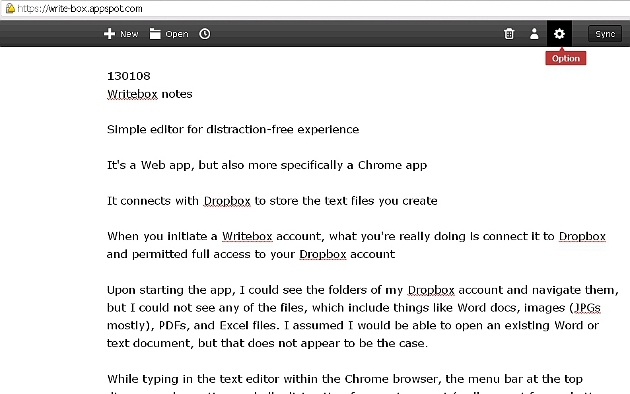
Writebox takes a different approach. Instead of trying to include every possible feature, it focuses on the basic writing experience. Its design emphasizes simplicity and distraction-free writing while allowing documents to stay connected with cloud-storage services.
Also read:TxMyZone: A Complete Guide to the Texas Student Portal, Course Requests, and Academic Planning
Why Is Minimalism Important in Writebox?
The word “minimalist” is important when understanding how writebox is designed. Minimalism is not simply about having a clean screen or a simple-looking interface. A genuinely minimalist writing tool tries to reduce the number of decisions a writer has to make while working.
For example, when you open a traditional word processor, you may immediately see options for:
- Fonts and text styles
- Page layouts
- Headings
- Spacing
- Colors
- Tables
- Margins
- Templates
- Formatting tools
These options can be helpful when you are preparing a finished document. However, they may become distractions when you are still trying to develop your ideas.
With writebox, the experience is much more straightforward. Instead of spending time deciding how your document should look, you can focus on the most important question:
The Main Idea Behind Writebox
The strongest idea behind writebox is that writing should be separated from unnecessary interface complexity.
Imagine that you need to write a quick article outline. You do not necessarily need a complicated document management system. You need a place where you can type.
Now imagine that you have an idea for a story while working on another computer. A cloud-connected writing tool can make that idea easier to access later.
This is where minimalist editing and cloud storage complement each other.
Writebox provides the writing environment, while connected cloud services can provide a place for documents to remain available across devices. The current Writebox website lists Dropbox, Google Drive, OneDrive, and Box among its cloud integrations.
The result is a simple workflow:
Open writebox → create or open a document → write → save or synchronize → continue later from another device.
That workflow is much easier to understand than a large productivity system with dozens of interconnected features.
Writebox and Dropbox
The connection between writebox and Dropbox is one of the most recognizable parts of its history.
Earlier versions and descriptions of Writebox specifically emphasized Dropbox integration. Historical reviews explained that users could create simple TXT documents, save them to Dropbox, and open existing TXT files stored there for editing.
This was particularly useful because plain-text files are portable.
A TXT file does not depend on a particular word processor in the same way that a complex proprietary document can. It can be opened by many text editors and operating systems.
For a writer, that can be liberating.
You can write a note on one computer, save it to cloud storage, and later open the same document from another environment.
Dropbox itself continues to provide tools for managing connected applications through its App Center. Dropbox explains that users can discover and connect third-party applications from the App Center and manage or disconnect connected applications through their account settings.
However, cloud synchronization should not be confused with a guarantee that every third-party application will always behave perfectly. Sync depends on the application, file state, network connection, permissions, and the cloud-storage system.
Dropbox’s own troubleshooting guidance notes that synchronization can be affected by network problems, files being open in another application, incompatible file names, read-only or locked files, and applications that do not save changes correctly.
This is an important practical point for anyone using writebox or another cloud-connected editor.
Why Plain Text Still Matters
Plain text may look old-fashioned in an era of sophisticated document editors, but it has a major advantage: simplicity.
A plain-text file primarily contains text rather than a large collection of formatting instructions.
This makes plain text useful for:
- Quick notes
- Ideas
- Drafts
- Outlines
- Journal entries
- Research notes
- Code snippets
- Simple documentation
- To-do lists
- Blog drafts
- Writing exercises
- Temporary text
- Personal knowledge archives
Plain text is also highly portable.
A TXT file can be opened on Windows, macOS, Linux, ChromeOS, and many mobile platforms. It does not require a particular premium office application simply to read the words.
For long-term writing workflows, this portability can be valuable.
If you are writing something that you may want to reuse years from now, a simple file format can reduce dependency on a particular application.
Writebox as a Distraction-Free Writing Tool
Distraction is one of the biggest challenges for modern writers, and it does not always come from social media, email, or other websites. Sometimes, the writing application itself can become a source of distraction. When an interface is filled with menus, formatting options, categories, templates, and customization tools, writers may spend more time organizing and adjusting their workspace than actually writing. Writebox takes a simpler approach by keeping the writing environment focused and clean, allowing users to concentrate on their ideas instead of constantly managing the application. This approach can be especially helpful during the first stage of writing, when the main goal is to get ideas onto the page. A first draft does not need to be perfect or beautifully formatted. It simply needs to exist. Once the ideas are written down, they can be moved to a more advanced application for editing, formatting, publishing, or collaboration when needed.
Does Writebox Reduce Cognitive Load?
The idea that minimalist writing software can reduce cognitive load is reasonable, but specific performance claims should be treated carefully.
Some descriptions circulating online claim that WriteBox reduces cognitive load by 37 percent and achieves save latency around 120 milliseconds. Those figures should not automatically be treated as independently verified product benchmarks without a reliable methodology or primary study supporting them.
The more defensible conclusion is conceptual: reducing interface choices can reduce the number of decisions a user has to make while writing.
That matters because writing already requires significant mental effort.
A writer may be thinking about:
- What should I say?
- Is this sentence clear?
- What should come next?
- Is the argument strong?
- Did I explain the idea properly?
- Who is the audience?
- What example should I use?
Adding dozens of interface decisions on top of these questions can create unnecessary friction.
Minimalist design attempts to remove some of that friction.
So the real value of writebox may not be a particular percentage reduction in cognitive load. Its value is that it creates fewer opportunities for the writer to leave the writing task.
Writebox for Students
Students can benefit from simple writing tools because academic work often begins with rough ideas.
A student might use writebox to create:
- Lecture notes
- Study summaries
- Essay outlines
- Research questions
- Reading notes
- Flashcard material
- Assignment ideas
- First drafts
- Personal study plans
The plain-text approach can be especially useful for students who do not want to spend extra time formatting their work. For example, when planning an essay, a student can begin by organizing the main ideas into a simple structure that includes an introduction, a main argument, supporting points with evidence, a counterargument, and a conclusion. This basic structure helps students arrange their thoughts clearly before developing them into a complete draft. At this stage, complicated formatting is not necessary because the main focus should be on building strong ideas and creating a logical flow. Once the structure is clear and the first draft is complete, the student can move the content into a word processor or another platform for further editing, formatting, and final presentation
Writebox for Writers and Bloggers
Writers and bloggers often use different tools at different stages of the writing process. A research tool can help collect information and ideas, while a word processor may be better for editing and preparing the final document. A publishing platform is then used when the finished article is ready to go online. The first-draft stage, however, is different. At this point, the main priorities are usually focus, speed, and getting ideas onto the page. Writebox can work well as a lightweight drafting environment because it allows writers to concentrate on their content without worrying about final formatting, images, links, SEO settings, or publishing options. Once the first draft is complete, the content can be reviewed, improved, and transferred to the appropriate publishing workflow. This separation between writing and publishing can make the overall process easier because you do not have to complete every stage at the same time. Writing software does not need to do everything to be useful; sometimes, a tool becomes more effective when it focuses on doing one important job well.
Writebox for Quick Notes
Not every thought needs to become a complete document. Sometimes you simply need a quick place to record an idea before it disappears. You might want to remember something you need to do tomorrow, save an idea for a future article, write down a question you want to research later, or capture the opening idea for your next project. A minimalist notepad such as writebox can be useful for these small pieces of information because you can record them without creating a complicated workspace. The main advantage is speed. When you only need to save a sentence or a short thought, a simple writing environment can help you capture the information quickly and return to your main task.
Writebox for Drafting Before Formatting
One of the most practical ways to use writebox is as a first-draft tool. Writing usually involves several stages, beginning with generating ideas and creating a rough draft, followed by organizing the content, editing it, formatting the final version, and eventually publishing it. Many writers try to handle all of these stages at once, which can make the process feel unnecessarily difficult. A more effective approach is to separate the creative work from the formatting and publishing work. Writebox can be particularly useful during the early stages because the focus remains on writing rather than visual document design. You can put your ideas on the page, develop your argument, and create a complete first draft without worrying about how everything will look in the final version. Once the writing is finished, formatting and presentation can come later.
Writebox Across Different Devices
A major advantage of browser-based software is accessibility.
The current Writebox website states that its writing environment can be accessed through a web browser on Windows, Mac, Linux, and Chromebook devices.
This can be useful for people who work across different computers.
For example, a writer might use:
- A Windows PC at home
- A Mac at work
- A Chromebook while traveling
- A Linux machine for technical work
A browser-based writing environment can reduce the need to maintain a separate writing application on every computer.
Cloud integration adds another layer of convenience because documents can remain associated with cloud storage rather than being trapped on one device.
Writebox and Offline Work
Offline behavior is an important consideration for any cloud-based writing workflow.
Some historical descriptions of Writebox emphasized offline support, while modern cloud applications can vary in exactly how offline editing and synchronization work.
Users should therefore distinguish between two concepts:
Offline writing means you can continue typing without an active internet connection.
Offline synchronization means changes can later be transferred to cloud storage once connectivity returns.
These are not necessarily the same thing.
If offline access is important to your workflow, test it before relying on it for critical work.
For important documents, it is also sensible to maintain an independent backup rather than assuming that cloud synchronization alone is a complete backup strategy.
Writebox and File Safety
A simple writing tool does not remove the need for good file-management habits. If your notes, drafts, research, or other documents are important, it is better to keep copies in more than one location. Cloud synchronization can make files easier to access across devices, but it should not automatically be treated as a complete backup system. Having additional copies can provide extra protection if a file is accidentally deleted, overwritten, corrupted, or affected by a synchronization problem.
A practical file-safety approach can include:
- An active copy stored through your cloud-storage service
- A local backup on your computer or another storage device
- An occasional archive copy for important or completed projects
This approach can be especially useful for professional writing, academic research, business records, and other information that would be difficult or time-consuming to recreate. Dropbox also provides troubleshooting guidance for synchronization problems, including situations involving locked or read-only files, files being used by another application, and network-related issues.
Writebox Compared With Traditional Word Processors
Traditional word processors are powerful and remain useful for creating polished documents. They are designed to handle many tasks that a minimalist writing tool may not be intended to handle. For example, a word processor can be helpful when you need:
- Complex formatting
- Tables and structured layouts
- Images and graphics
- Headers and footers
- Citations and references
- Printing options
- Professional templates
- Track changes and detailed editing
However, not every writing task requires all of these features. If you only need to write a paragraph, record an idea, or create a simple first draft, a feature-heavy word processor may provide more tools than you actually need.
Writebox represents the opposite philosophy. Instead of asking, “What features can we add?” the minimalist approach asks, “What can we remove without making writing difficult?” This difference helps explain why simple writing tools can still be useful even when powerful office applications are widely available.
Writebox vs. Note-Taking Apps
Modern note-taking applications can be extremely sophisticated.
Some include:
- Databases
- Backlinks
- Tags
- Search
- Graph views
- Attachments
- Web clipping
- Collaboration
- AI assistants
- Templates
- Task management
These tools can be excellent for managing large knowledge bases, connecting research, and organizing information across many projects. However, not every note needs to become part of a complex knowledge-management system. Sometimes, you simply need a blank page where you can write down an idea without worrying about tags, databases, links, or categories.
Writebox can be particularly appealing when immediacy and simplicity are more important than detailed organization. If your work requires a large, interconnected research database with advanced organization features, a more specialized knowledge-management tool may be a better choice. On the other hand, if your main goal is to find a quiet place to write, capture ideas, or create a simple draft, a minimalist editor such as writebox may be a more suitable option.
Writebox vs. Markdown Editors
Markdown sits somewhere between plain text and a fully formatted document. It provides more structure than basic text while keeping the writing process relatively lightweight. With simple symbols, writers can create headings, lists, links, and other basic elements without relying heavily on visual formatting tools.
This can be especially useful for people who regularly publish content online or work with text-based documents. Markdown allows writers to organize their content while keeping the underlying document simple and portable.
Also read:OncePik: Smart Picks for Technology, Lifestyle, Trends, and Home Improvement
Writebox, however, has historically been more closely associated with straightforward text editing than with being a complete Markdown publishing environment. This means the better choice depends on what you want from your writing tool.
If your main goal is to have a clean writing surface with minimal distractions, writebox’s simple approach can be appealing. If you need advanced Markdown previews, publishing workflows, extensions, or developer-focused features, a dedicated Markdown editor may be more suitable.
Writebox for Professional Work
Professionals often deal with information from many different sources throughout the day. Emails, messaging apps, calendars, meetings, project-management platforms, dashboards, and notifications can all compete for attention. In this environment, having a simple space for thinking can be surprisingly useful.
Writebox can serve as a lightweight workspace for capturing thoughts before they need to be placed into a formal business system. For example, before a meeting, you might quickly write down:
- Meeting objective
- Three important questions
- Key numbers or information
- Possible concerns
- Expected next steps
There is no need to create a detailed project page when you only need a temporary space to organize your thoughts. After the meeting, useful information can be transferred into the appropriate business system, while unnecessary notes can be removed or archived.
This highlights one of the practical strengths of writebox. It does not have to replace every other tool in a professional workflow. Instead, it can provide a simple layer between an initial thought and fully organized information.
Writebox for Creative Writing
Creative writing often benefits from freedom and uninterrupted attention. A novelist may not need formatting controls while working on a first draft, while a poet may prefer nothing more than a blank page and a place to experiment with words. Similarly, a screenwriter might eventually use specialized software for professional script formatting but still find a simple text environment useful during brainstorming.
A minimalist writing space can encourage writers to focus on the parts of creative work that matter most, such as voice, characters, scenes, arguments, emotions, and ideas. It can also be helpful during freewriting, a technique in which you continue writing without stopping to perfect every sentence.
Because a simple interface provides fewer reasons to pause and adjust the document, writebox can support a more natural flow during early creative work. The goal is not to make every sentence perfect immediately. The goal is to keep the ideas moving and give the creative process room to develop.
Writebox for Developers and Technical Users
Developers also work with plain text constantly.
Source code, configuration files, documentation, logs, notes, README files, and planning documents are all primarily text-based.
A lightweight editor can therefore fit naturally into a technical workflow.
However, developers should recognize that writebox is not a replacement for an integrated development environment.
An IDE may provide:
- Syntax highlighting
- Code completion
- Debugging
- Git integration
- Error detection
- Project navigation
- Extensions
Writebox is better understood as a simple writing or text-editing environment.
For documentation and quick notes, that can be enough.
For serious software development, specialized development tools remain more appropriate.
The Psychology of Minimalist Software
The popularity of minimalist software reveals something important about productivity.
People often assume productivity increases when software provides more capabilities.
That is not always true.
Every feature has a cost.
The cost may be:
- Visual complexity
- Learning time
- More settings
- More decisions
- More notifications
- More maintenance
- More opportunities for distraction
Minimalist software attempts to reduce those costs.
This does not mean minimalism is automatically better.
The correct amount of complexity depends on the task.
If you are writing a simple note, low complexity is beneficial.
If you are producing a 200-page professionally formatted report, low complexity may become a limitation.
The best software is therefore not the software with the fewest features.
It is the software whose level of complexity matches the job.
Why Writebox Can Still Be Relevant
Writebox first appeared when browser-based applications and cloud storage were becoming increasingly useful. Historical coverage from the early 2010s highlighted its ability to create simple text files, save them through Dropbox, and provide a distraction-free writing environment. Although technology has changed greatly since then, the basic need for simple and accessible writing tools has not disappeared.
People still need a quiet place to write, capture ideas, and access their files across devices without dealing with unnecessary features. Modern applications may offer far more tools, but that does not mean every writer needs them. For users who value simplicity, focus, and a straightforward writing experience, the minimalist concept behind writebox can still be relevant today.
How to Use Writebox Effectively
If you want to get the most from writebox, it helps to give it a clear and specific role in your writing process rather than trying to turn it into a complete productivity system. A simple workflow can make your files easier to manage while keeping the writing process focused and organized.
Step 1: Create a Simple Writing Folder
Start with a clear folder for your active writing projects. You can organize your files into simple categories such as:
- Ideas
- Drafts
- Research Notes
- Completed
- Archive
A simple folder structure makes it easier to find documents without creating unnecessary organizational complexity.
Step 2: Use Descriptive File Names
Give each document a name that clearly explains what it contains. Instead of using a generic name such as “New Document,” choose something more specific, such as “Summer Travel Article Draft,” “Meeting Notes August 2026,” “Novel Chapter 03,” or “Product Ideas.” Clear file names can save time later because you can understand the purpose of a document without opening it first.
Step 3: Write Without Formatting First
When creating a first draft, focus on your ideas rather than how the document looks. Avoid stopping every few sentences to adjust fonts, spacing, headings, or other formatting details. Getting the main ideas onto the page first can make the writing process smoother.
Step 4: Edit Later
Once your draft is finished, go back and review it carefully. Look for unclear sentences, unnecessary information, weak sections, grammar mistakes, and problems with the overall structure. After editing, you can move the document into another tool if you need advanced formatting, publishing features, or a more polished presentation.
Step 5: Maintain Backups
Important documents should have independent copies. Even when your files are synchronized through a cloud service, it is wise not to depend entirely on one application, device, or synchronization system. Keeping appropriate backups can provide additional protection for valuable writing, research, and professional documents.
Advantages of Writebox
Writebox has several qualities that make the minimalist approach attractive.
Simple Interface
The biggest advantage is simplicity.
A clean writing environment can help users begin writing quickly.
Distraction-Free Workflow
The design philosophy emphasizes writing rather than excessive interface controls.
Browser Accessibility
The current service is designed for browser access across several desktop operating systems and Chromebook.
Cloud Integration
Writebox supports major cloud-storage providers, including Dropbox and other services.
Portable Writing
Plain-text workflows can make documents easier to move between applications.
Good for Quick Drafts
The minimalist approach is particularly useful when the goal is simply to get words onto a page.
Low Learning Curve
A basic editor generally requires less training than a large productivity platform.
Limitations of Writebox
No tool is perfect.
Understanding limitations is important before choosing any application as part of a serious workflow.
Limited Formatting
Minimalism means fewer formatting features.
If you need complex layouts, writebox may not be enough.
Not a Complete Office Suite
Writebox should not be treated as a replacement for advanced word-processing software.
Not a Full Knowledge Base
Users who need databases, backlinks, complex tagging, or interconnected research systems may prefer specialized applications.
Cloud Sync Requires Care
Synchronization can fail or behave unexpectedly under certain conditions. Dropbox itself lists network problems, locked files, open files, file-name compatibility, and other factors that can interfere with syncing.
Collaboration May Be Limited
A minimalist text editor is not necessarily designed to replace collaborative document platforms.
Mobile Experience Should Be Tested
Before depending on any browser-based writing workflow for mobile work, test the actual device and browser combination you intend to use.
Is Writebox Good for SEO Writing?
Writebox can be useful for SEO writers, but it is not an SEO platform.
This distinction is important.
SEO involves many activities beyond writing:
- Keyword research
- Search-intent analysis
- Content planning
- Competitor research
- On-page optimization
- Internal linking
- Technical SEO
- Metadata
- Content updating
- Performance monitoring
Writebox does not need to perform all of these jobs.
Instead, it can be used for the drafting stage.
For example, an SEO writer can research a topic separately, create an outline, open writebox, and draft the article without constantly switching between formatting controls.
Afterward, the content can be moved into a CMS or publishing platform for optimization and publication.
This workflow can be surprisingly effective because it separates thinking from publishing.
Is Writebox Free?
Historical descriptions of Writebox presented the service as free, while the current official website focuses on the application and its writing environment rather than presenting a simple pricing comparison on the main page.
Because software pricing and availability can change, users should check the current official Writebox service before assuming that every feature or integration is available under a particular plan.
This is especially important for cloud connections and account-related features.
Is Writebox Still Worth Using?
Whether writebox is still worth using depends on what you expect from a writing application. If you need a full-featured word processor with advanced formatting and document tools, writebox may feel too simple, while users looking for a complex knowledge-management platform may also need something more powerful. However, if your priority is focused writing, simple text editing, browser access, and cloud-connected documents, its minimalist approach can still be appealing. The biggest reason to choose writebox is not that it offers more features than other applications, but that it intentionally does less, allowing you to spend less time managing the software and more time focusing on your writing.
Who Should Use Writebox?
Writebox can be a good fit for:
- Bloggers
- Students
- Novelists
- Journalists
- Copywriters
- Researchers
- Freelancers
- Remote workers
- Developers
- Teachers
- People who write daily
- Anyone who dislikes complicated writing software
It can be particularly useful for people who find themselves spending more time organizing their writing environment than actually writing.
Who May Want a Different Tool?
You may prefer another application if you need:
- Advanced document formatting
- Professional page layouts
- Extensive collaboration
- Advanced citation management
- Database functionality
- Large knowledge graphs
- Advanced Markdown publishing
- Code debugging
- Complex project management
The important question is not whether writebox is better than every other application.
The better question is whether its simplicity matches your workflow.
A Practical Writebox Workflow for Better Productivity
A useful way to get more value from writebox is to give it one clear purpose: capturing and developing ideas. You can use it as your first-draft environment while keeping research, final formatting, publishing, and project management in separate tools. This creates a cleaner workflow because each application has a specific role instead of trying to manage every part of your work in one place. It can also reduce the temptation to constantly reorganize your workspace. When a new idea appears, you do not need to spend time deciding where it belongs or how it should be formatted. You can simply write it down and return to it later when you have time to review and organize the useful material.
Writebox and the Future of Simple Writing Tools
The future of productivity software may continue moving toward greater automation, artificial intelligence, and advanced features, but there will likely still be a place for simple writing tools. Technology can help generate suggestions, organize information, synchronize files, and track deadlines, but writing still begins with a person deciding what they want to communicate. An AI assistant can offer ideas, a database can organize information, a cloud service can keep files synchronized, and a project-management platform can manage tasks, but none of these removes the need for human thought and clear communication. A minimalist writing environment can provide a quiet space for that thinking, which is one reason the basic idea behind writebox remains relevant.
Important Note About Writebox Performance Claims
Some online descriptions associate WriteBox with precise measurements such as a 37 percent reduction in cognitive load and save latency of 120 milliseconds or less.
Also read:Eo Pis: A Complete Guide to Enterprise Operations Process Information Systems
Those numbers should not be repeated as established facts without reliable primary evidence.
A professional article should distinguish between a product’s documented features and claims that appear in secondary descriptions.
The current official Writebox site confirms its minimalist writing philosophy, browser-based access, and cloud integrations.
The available evidence does not provide enough independent information to establish the specific 37 percent and 120-millisecond figures as universal performance measurements.
This distinction matters because trustworthy technology content should avoid presenting marketing-style or unsupported statistics as scientific facts.
Tips for Getting Better Results From a Minimalist Editor
A simple tool works best when paired with a simple writing system.
Try these habits:
Keep One Idea Per File
If a note becomes large, separate it into logical documents.
Use Clear Titles
A descriptive title makes future retrieval easier.
Write First, Edit Later
Do not try to produce a perfect first draft.
Use Plain Language
Simple writing is often clearer writing.
Keep a Backup
Cloud synchronization is useful, but independent backups provide additional protection.
Review Old Notes
A simple note becomes more valuable when you return to it.
Archive Finished Work
Move completed projects into an archive folder rather than deleting them immediately.
Avoid Over-Organizing
If your folder system becomes complicated, you may have defeated the purpose of minimalism.
Final Thoughts
Writebox represents a simple but useful idea: writing software does not have to be complicated to be valuable. Its focus on distraction-free writing, browser accessibility, plain-text workflows, and cloud integration makes it appealing to people who want to concentrate on words rather than menus and formatting controls. The connection with Dropbox has been an important part of its history, while the current service also supports other major cloud providers.
The biggest lesson from writebox is not that minimalist software is always better. It is that the right amount of software depends on the task. When you are creating a first draft, brainstorming, taking a quick note, or developing an idea, simplicity can be a major advantage. When you need advanced formatting, collaboration, databases, or specialized publishing features, a more powerful application may be appropriate.
For writers who frequently feel overwhelmed by complicated productivity systems, writebox offers a useful alternative philosophy: remove distractions, open a blank page, and start writing.
Frequently Asked Questions About Writebox
Can Writebox replace Microsoft Word?
Writebox can replace a basic word processor for simple writing and plain-text drafting, but it is not intended to replace every advanced feature found in Microsoft Word. If you need complex formatting, tables, page layouts, professional templates, or extensive document tools, a full word processor is likely a better choice.
Can I use Writebox for long documents?
Yes, a minimalist text editor can be used for long documents, but your experience will depend on the features you need. For a long novel or article draft, simple text can be an advantage. For a professionally formatted final manuscript, you may eventually want to move the text into another application.
Is Writebox suitable for sensitive information?
Users should always consider the privacy and security policies of any cloud-connected application before storing sensitive information. For highly confidential material, review the current service’s privacy information and account permissions carefully, and consider whether cloud storage is appropriate for the specific information.
Can Writebox be used for team projects?
Writebox can be useful for drafting material, but whether it is suitable for an entire team depends on the collaboration features available in the current version and the cloud service being used. Teams that require real-time co-editing, comments, approvals, version workflows, and advanced permissions may need a dedicated collaboration platform.
What is the biggest reason to use Writebox?
The biggest reason to use writebox is focus. If you want a simple environment where you can concentrate on writing without being surrounded by unnecessary features, its minimalist approach can be valuable. It is best viewed as a focused writing tool rather than an application that tries to manage every part of your digital life.